Feature
Local Pickup in the Cart Widget
A third card next to Home delivery and Pickup points. Customers who choose it land in checkout on store pickup and pick your store there.
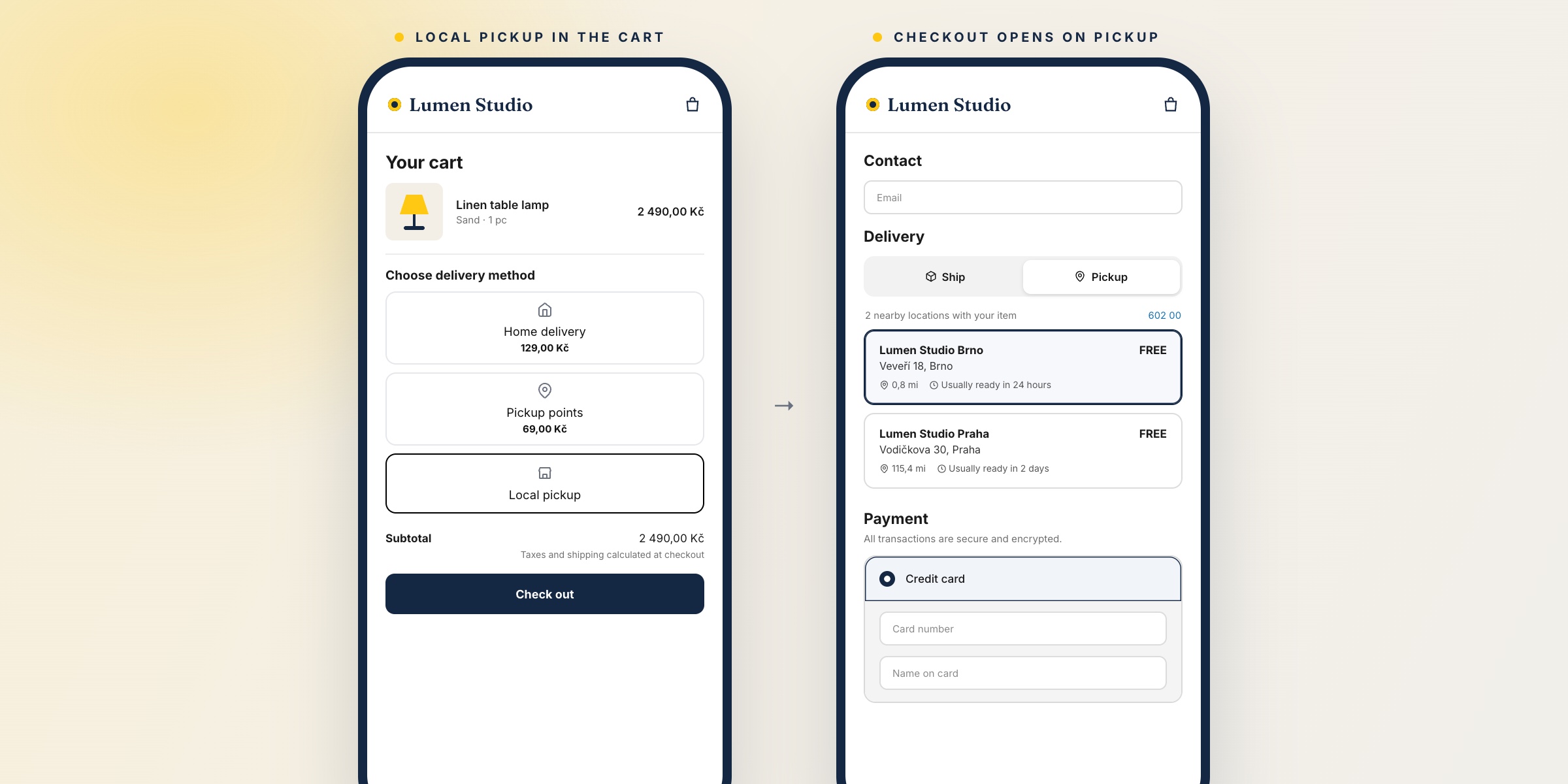
Until now the cart widget offered Home delivery and Pickup points. Customers who wanted to collect the order in your shop found that option only in checkout, after filling in their contact details.
The cart widget can now show a third card, Local pickup. When the customer chooses it, checkout opens straight on store pickup and the customer picks the store there.
- Your Shopify pickup locations. Checkout offers the locations with Pickup in store turned on, an address, and the items in stock or available through a store transfer.
- Only where you have a store. Pick the countries in the settings. The widget decides the country the same way as for pickup points: by the storefront's market or by its language. An empty list shows the card everywhere.
- Switching back works. If the customer then chooses Home delivery or a pickup point, checkout opens on shipping again.
- Your own wording. The card's title and subtitle are in Widget text translations, per language. The default title is Local pickup in the customer's language.
Express buttons in the cart (Apple Pay, Shop Pay) skip the choice made in the widget.
Turn it on in Settings → Cart widget → Advanced settings → Show local pickup. It is off by default and works on all plans. Setup details are in the documentation.