Pickup points as shipping rates in checkout
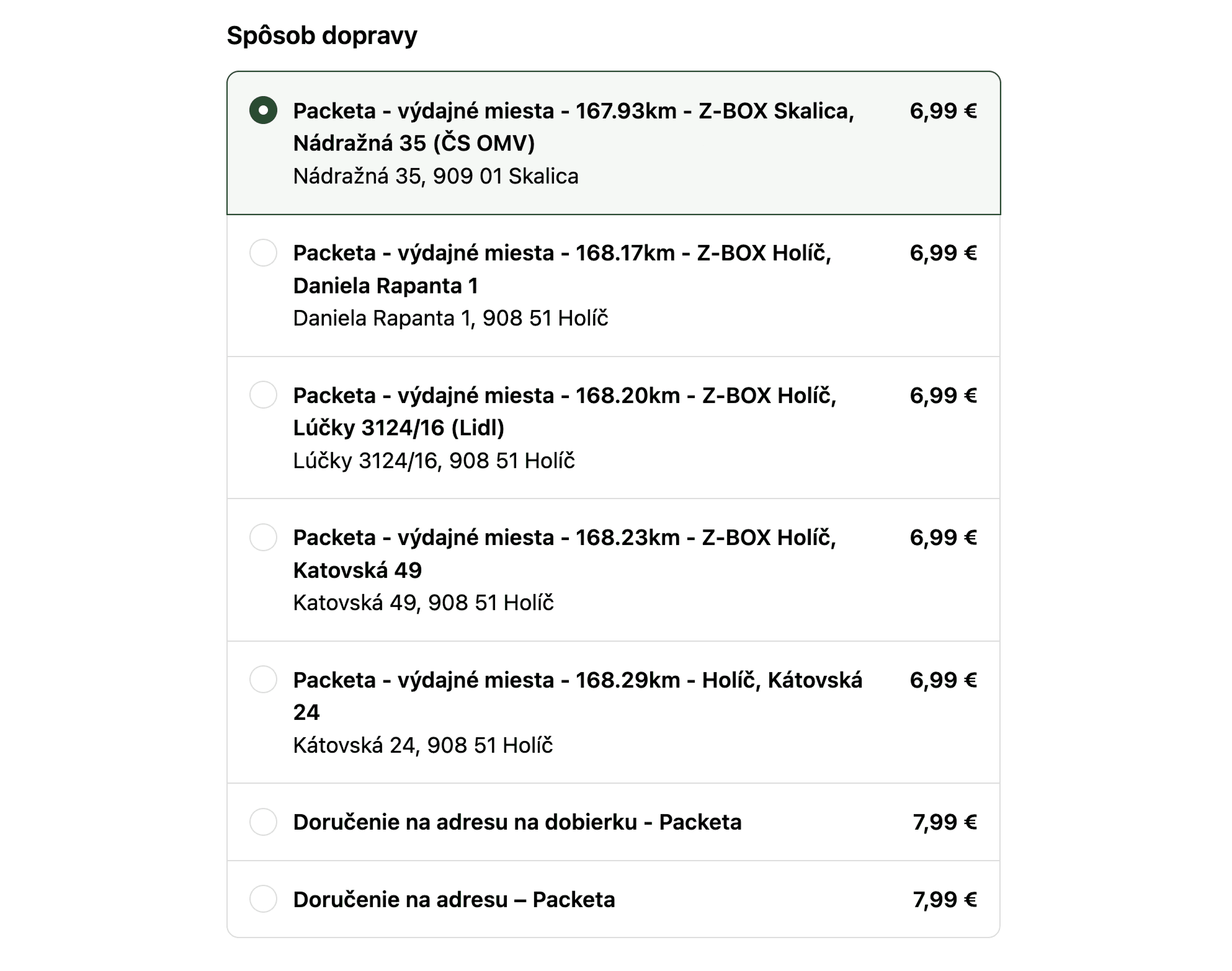
With Carrier Calculated Shipping (CCS), every nearby pickup point appears as its own selectable shipping rate at checkout, sorted nearest first, no map and no extra steps. Prices sync automatically from your Shopify shipping settings.
14-day free trial · no Shopify Plus needed



Why
Every nearby pickup point as its own shipping rate
Without checkout shipping rates
- 1Pickup points behind a map or an extra step
- 2Choosing a point in checkout needs Shopify Plus
- 3Customers look for the nearest point themselves
With checkout shipping rates
- 1Customer enters the address
- 2Picks a point from the rates
- Done.
One rate per point
Distance, carrier and address in the label
Your Shopify prices
Flat, free over a threshold or by weight
No Shopify Plus
Runs on Advanced and annual Grow
How it works
Pickup points as native rates (CCS) during checkout
Native checkout experience
Each pickup point shows as a separate rate with distance, carrier and address, like “0.4 km • Zásilkovna • Z-BOX Pardubice”. The label format is fully customizable with template variables.
Prices synced from Shopify
Set flat, free-above-threshold or weight-based prices in your Shopify shipping settings and click Sync. Globe reads every rate and condition. When a cart qualifies for free shipping, the cheapest matching rate is picked automatically.
No Shopify Plus required
CCS runs on the Shopify Advanced plan (included) and the Shopify Grow annual plan. Shopify Plus stores get the same outcome through Globe's native in-checkout selector instead.
Setup guide: Checkout Shipping (CCS) documentation ↗
Setup and cost
Your Shopify plan, your Shopify prices
CCS is included on Shopify Advanced and on annual Grow, and a paid Shopify add-on on monthly Grow. Globe reads your rates from Shopify, so you set prices where you always have.
What you need
- CCS on your planAdvanced, or Grow billed annually
- Rates in ShopifySet them as usual, then click Sync
- A rate labelMix distance, carrier, point name and street
FAQ
Frequently asked questions
Can't find your answer? Write to us.
Which Shopify plans support checkout shipping rates (CCS)?
Shopify Advanced includes CCS; on the Shopify Grow annual plan it is included too (Shopify Support may need to activate it). On monthly Grow it's available as a paid Shopify add-on. Shopify Plus stores should use Globe's in-checkout pickup point selector instead. CCS is not needed there.
How are the prices for each pickup point calculated?
Prices are synced from your normal Shopify shipping rates: flat price, free shipping above an order value, or weight-based. Globe reads the configured rates per carrier; re-sync after you change them in Shopify.
Can I change how pickup points are labelled in checkout?
Yes. The rate label and description are templated. You can combine variables like distance, carrier, point name, street and city to match your store's tone.
Do all carriers support CCS?
Most do, but not all. Carriers that can't appear as checkout rates are marked directly in Globe, and customers can still pick their point via the cart widget or after checkout.
More in Globe
Every feature works with the others
Every feature is part of Globe, the top-rated Shopify pickup points app.
14-day free trial
Show the nearest pickup points as shipping rates.
Streamline your shipping with 65+ carriers, automated label printing, and over 5M+ pickup points worldwide. Start in minutes with our free 14-day trial. Quick setup, no commitments.
