Feature
Pick & Ship: Pack, Label and Print From One Page (Beta)
A packing station inside Globe. Scan each item with a barcode scanner, then create and print the shipping label without leaving the order. Off by default, for stores that pack their own parcels.
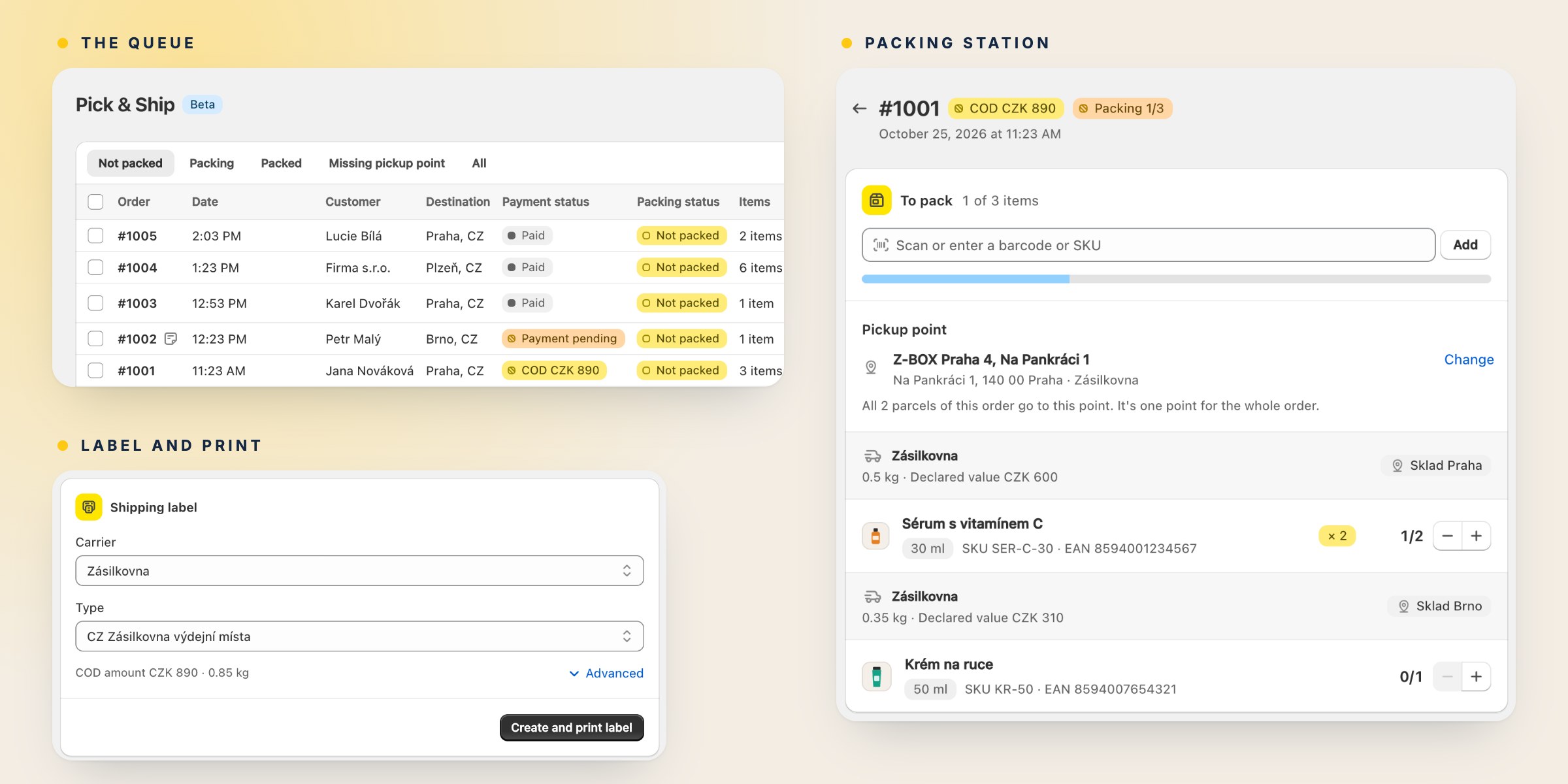
Pick & Ship is a packing station inside Globe. It lists the orders waiting to be packed, checks every item with a barcode scanner, and creates and prints the shipping label on the same page.
It is in beta and off by default. Turn it on if you pack your own parcels. If a 3PL or a WMS packs for you, leave it off.
- The queue. Unfulfilled orders, newest first, laid out like the Orders page in Shopify. Tabs for not packed, packing, packed and orders missing a pickup point. Filters for tags, date, delivery method and label status, and for location if you ship from more than one.
- Scan to pack. Scan an order number to open the order, then scan the items by EAN or SKU. A wrong item gets a sound and a message. Items without a code are added with +. Any USB or Bluetooth scanner that types like a keyboard works.
- One group per parcel. A split order shows each fulfillment with its location, weight and declared value.
- Pickup point. An order without a point gets one from the queue or from the order, from the same list of points as on the order page.
- Label and print. After the last item, press Enter. Globe creates the label with the carrier and product it would preselect on the order page, and the print dialog opens. One label for the whole order, or one per fulfillment, as set in Globe settings.
- Labels printed first. If a Flow creates and fulfils the label before you pack, scan the printed label and its order opens. Orders fulfilled since you turned Pick & Ship on stay in the queue until they are packed.
- History. Who packed the order and when, next to the order's own Shopify timeline.
Enter moves to the next step, J and K go to the previous and next order, Esc goes back to the queue.
Details are in the documentation. It is a beta, so if something slows you down while packing, write to us in the app chat.